
You can run a freelance practice, studio, or small agency on seven databases: products, projects, finances, clients, marketing, team, and processes. Set them up once in a tool like Notion or Airtable, link them to each other, and your business stops living in your head and scattered spreadsheets.
The payoff isn't tidiness for its own sake. It's that the business can run without you refereeing every question, because the answer to "where is that?" is always the same place.
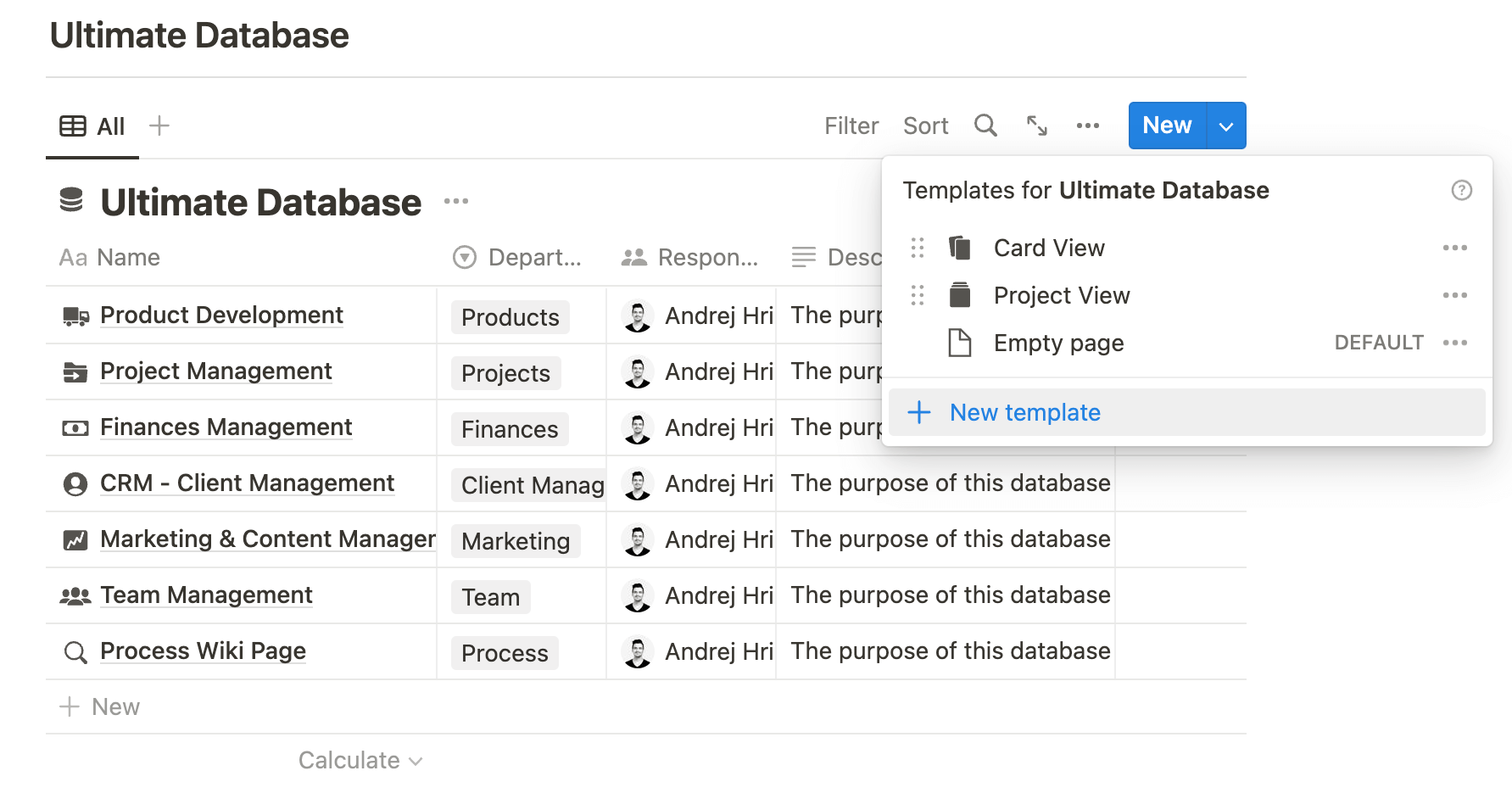
Here's what goes in each database and the fields that earn their keep. Build them in whatever tool your team already opens daily; the structure matters more than the software.
1. Products and services
One entry per thing you sell: each service package, productized offer, or retainer tier.
- Fields: name, current price, scope (what's included and explicitly excluded), delivery time, and a link to the template or process used to deliver it.
- Why it matters: when scope and price live in one place, proposals take minutes and you stop quoting three different prices for the same work in the same month.
2. Projects
Every active and past engagement, one entry each, linked to the client who bought it and the service it belongs to.
- Fields: status (a short pipeline like Scoping, In progress, Review, Done), owner, deadline, deliverables, and links to the files.
- The habit that makes it work: if a project isn't in the database, it doesn't exist. No side-channel work agreed in a DM and tracked nowhere.
3. Finances
This doesn't replace your accounting software; it's the operational money view you check weekly.
- Fields: invoices with status (draft, sent, paid, overdue), recurring expenses like subscriptions, and each project's budget versus actual.
- Quick win: a filtered view of unpaid invoices older than 14 days. Most cash-flow problems are not revenue problems; they're follow-up problems.
4. CRM: clients and leads
Every lead and client, from first contact onward, linked to their projects and invoices.
- Fields: contact details, source (how they found you), stage (lead, proposal sent, active, past), last contact date, and notes from every call.
- Why the "source" field pays for itself: after a year, it tells you where your best clients actually come from, which is where your marketing budget should go.
5. Marketing and content
A pipeline for everything you publish: blog posts, social content, newsletters, case studies.
- Fields: status (idea, drafting, review, published), channel, publish date, owner, and the link once live.
- Bonus: keep a running ideas list in the same database. The difference between "we should post more" and actually posting is usually just a visible queue.
6. Team
One entry per person, including freelancers and contractors, because they're the ones whose details you'll scramble for.
- Fields: role, rate, availability, skills, contract and NDA links, and who owns which recurring responsibility.
- Why it matters: when a project lands, you want "who can take this, at what rate, starting when?" answered in one view, not four chat threads.
7. Process wiki
The how-we-do-things library: one page per repeatable process, from onboarding a client to publishing a blog post to sending the final invoice.
- Format that works: numbered steps, the owner, and links to the exact templates used. Write each page the first time you do the task a second time.
- The payoff: delegation stops meaning "sit next to me for a week." A documented process is the only way work survives vacations, turnover, and growth.
How do the seven databases connect?
The structure clicks when you link them: a client connects to their projects, projects to invoices and deliverables, team members to the projects they own, content to the campaigns it supports. One client entry then shows the whole relationship at a glance: every project, every payment, every conversation.
If you build this in Notion, our guide to building business dashboards in Notion covers the setup in detail. And once the databases exist, the repetitive updates between them are exactly what automation tools handle well; see our Make.com automation list for ideas.
FAQ
Which tool should you build these in?
Notion and Airtable are the usual picks: both handle linked databases well. Notion wins if your processes are document-heavy; Airtable if you want spreadsheet-style views and heavier automation. The one your team will actually open daily beats the one with the best feature list.
Do you need all seven from day one?
No. Start with projects and CRM, since those bleed money fastest when messy. Add finances next, then build the rest as the pain appears.
Isn't this overkill for a solo freelancer?
Scale it down, not away: the same seven categories still apply, just with fewer entries. The structure is what lets you eventually hand work off without a month of explaining.