
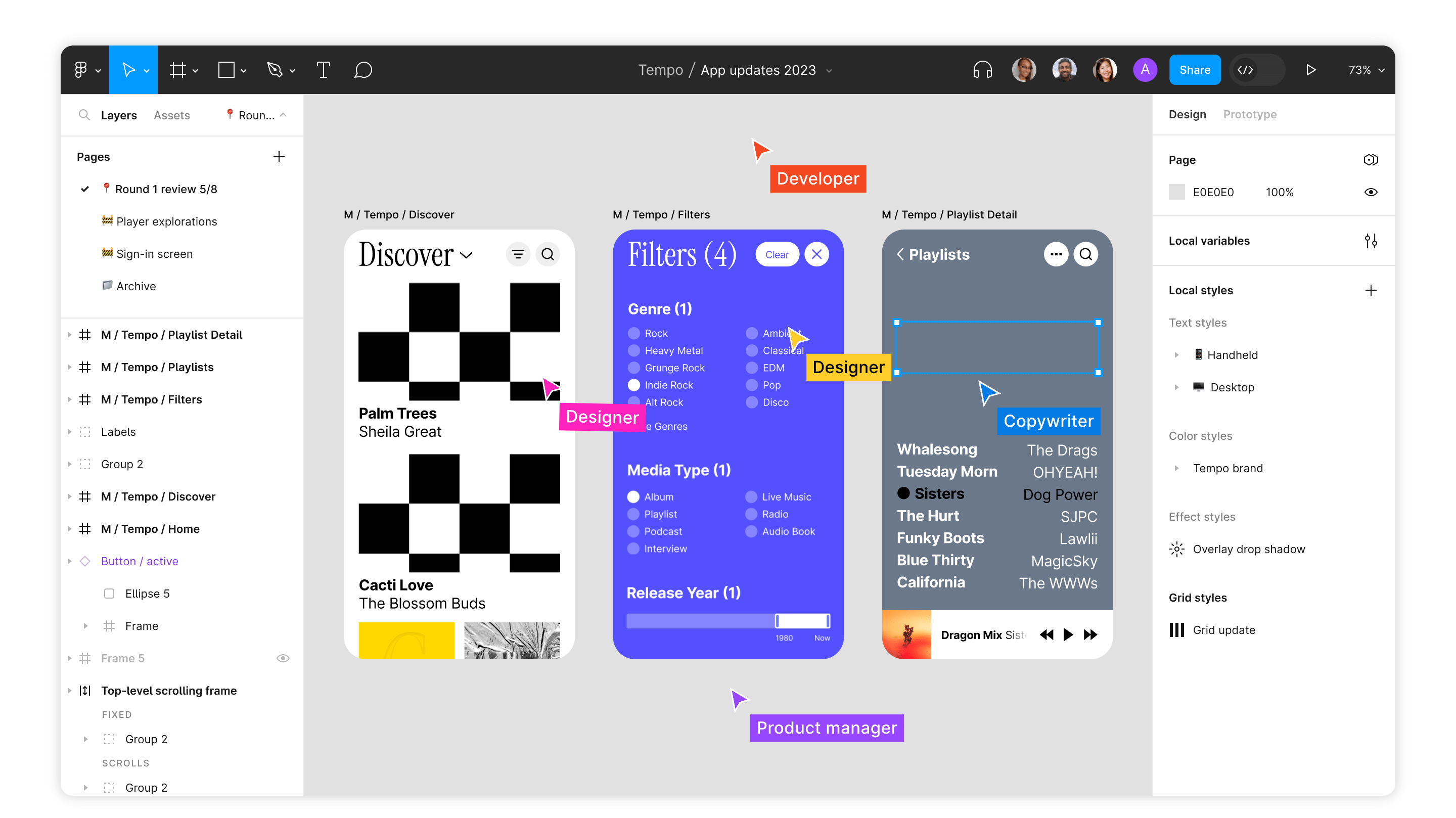
Yes, you can design a complete website in Figma, and most professional web designers now do. Figma is a cloud-based design tool where you sketch, design, prototype, and collect feedback in one shared file, with everyone looking at the same version. The UX Tools annual design survey has shown Figma as the dominant choice for years, with roughly nine in ten designers naming it their primary UI design tool.
Here's why it won, how to use it for web design step by step, and what it costs.
Why did Figma take over web design?
Web design used to be a relay race: wireframe in one tool, design in another, prototype in a third, then email files around and pray everyone had the latest version. Figma collapsed that into one browser tab. The features that matter for website work:
- One file, everyone in it. Designers, developers, and stakeholders work in the same live document. Comments land directly on the design, and "which version is current?" stops being a question.
- Cloud-based, so no installs. It runs in a browser on any machine. Client wants to review from a laptop in an airport? Send a link.
- Interactive prototyping. Link frames together and simulate clicks, hovers, and page transitions, so you test the experience before anyone builds it.
- Components and styles. Build a button once, reuse it everywhere, change it in one place. This is how design systems stay consistent across a 40-page site.
- Developer handoff built in. Developers inspect spacing, colors, and assets straight from the file. No redlining PDFs like it's 2012.
- A huge community. Free templates, UI kits, and plugins cover almost every starting point, which flattens the learning curve considerably.
How do you design a website in Figma, step by step?
- Set up frames. Create a frame for each key screen size. A desktop frame around 1440px wide plus a 375px mobile frame covers the decisions that matter.
- Add a layout grid. A 12-column grid keeps sections aligned and makes the eventual development far more predictable.
- Define styles first. Colors, text styles, and effects before any page design. Ten minutes here saves hours of inconsistency later.
- Build components. Buttons, navigation, cards, footers. Use variants for states like hover and active, so a button is one component, not six lookalikes.
- Design the pages. Start with the homepage hero and work down. Design mobile alongside desktop, not as an afterthought.
- Prototype the key flows. Wire up the main journey (landing to contact, say) and click through it like a skeptical visitor would.
- Share and gather feedback. One link, view or edit access, comments pinned to exact spots on the design.
- Hand off to development. Developers inspect the file and export assets directly. If the build is in Webflow, a well-structured Figma file translates almost one to one; we covered that side in our Webflow development guide.
Is Figma free for web design?
For solo designers and small projects, genuinely yes. The free Starter plan includes Figma's core design features, a limited number of shared design files, and unlimited personal drafts, with no cap on viewers. You can design a full website without paying anything.
Paid plans add what teams need: unlimited files, shared team libraries, branching, and admin controls. At the time of writing, paid seats run from around $12 to $16 per editor per month for professional tiers, with organization and enterprise tiers above that. Figma has reworked its seat types and pricing more than once, so check the official pricing page before budgeting.
The practical upgrade trigger is team libraries: once two or more designers share components across projects, the paid plan pays for itself in avoided inconsistency.
Where is Figma heading?
The interesting shift is that Figma keeps moving closer to the finished product. Dev Mode gives developers a dedicated inspection view, and Figma has been expanding toward publishing designs directly to the web with Figma Sites, in beta at the time of writing. The gap between "designed" and "live" keeps shrinking.
Our take: for serious business sites, the design-in-Figma, build-in-Webflow workflow still wins. Figma is where thinking happens fast and cheap; the build platform is where performance, CMS structure, and SEO live. Use each for what it's best at.
FAQ
Can Figma build the actual website?
Figma primarily produces designs and prototypes, not production sites. Figma Sites is changing that for simpler pages, but business sites with CMS content and SEO needs are still better built on a platform like Webflow.
Is Figma hard to learn?
It's one of the friendlier professional design tools. Basic page layouts take a weekend to get comfortable with; mastery of components, auto layout, and variants takes a few projects.
What's the difference between a Figma prototype and the real site?
A prototype is a clickable simulation: perfect for testing flows and getting sign-off, but it has no real code, content management, or search presence. Treat it as the rehearsal, not the performance.