
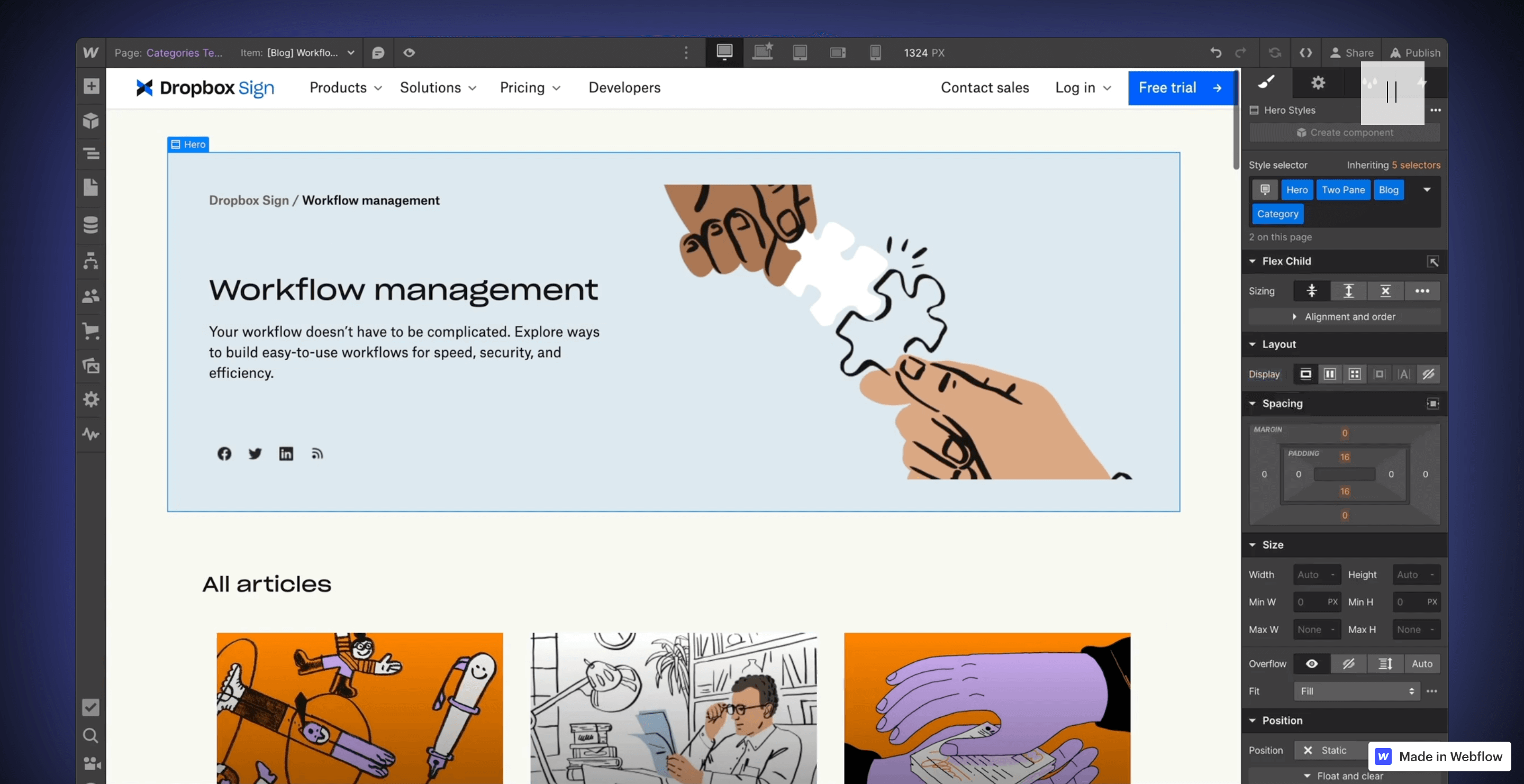
Webflow development is website building where design and code happen in one place: you design visually on a canvas, and Webflow writes production-grade HTML, CSS, and JavaScript underneath. No handoff from designer to developer, no "that's not what the mockup looked like" meetings. For most marketing sites, that collapses weeks of back-and-forth into days.
Here's how it works, what's under the hood, and what you're actually hiring when you hire a Webflow developer.
What is Webflow development?
The traditional process splits a website into two jobs: designers draw it, developers rebuild it in code. Every handoff between those jobs loses detail and adds time. Webflow merges them. Five things define the approach:
- A visual canvas with real power. You build layouts, set spacing, and create interactions directly. It looks like a design tool but behaves like a development environment: what you see is the actual site.
- Responsive by design. You style each breakpoint (desktop, tablet, mobile) in the same tool, so responsive behavior is deliberate, not patched in later.
- A built-in CMS. You define content collections (blog posts, case studies, team members) with custom fields, and editors manage content without touching the design. If you're new to the concept, start with why content management systems are essential.
- Custom code when you need it. Webflow minimizes coding but doesn't forbid it. Embeds, custom JavaScript, and third-party integrations slot in where the visual tools stop.
- Hosting included. Publishing is one click to Webflow's managed hosting, with SSL and backups handled. No deployment pipeline to maintain.
What language is Webflow built on?
A fair question, since you rarely see the code. Webflow translates everything you do visually into the standard languages every browser reads:
- HTML for structure. Every element on the canvas becomes a real HTML element, and a careful builder produces clean, semantic markup.
- CSS for styling. The style panel maps almost one-to-one to CSS properties. If you know CSS, Webflow feels like driving it with a steering wheel instead of a keyboard.
- JavaScript for behavior. Webflow's interactions generate it for you; developers add their own for anything beyond the built-in tools.
- A REST API for the CMS. Your content lives in a structured database you can read and write programmatically, which is what makes integrations and automations possible.
You don't need to know any of these to use Webflow. But the best Webflow work comes from people who do, because they understand what the visual controls are really doing. This is also why the skill transfers: a Webflow developer is working with web fundamentals, not a proprietary black box.
What does a Webflow developer actually do?
Part designer, part front-end developer. On a typical project, the job covers seven areas:
- Design implementation. Turning mockups (often from Figma; here's how we design websites in Figma) into a pixel-faithful, living site.
- Responsive builds. Making the layout genuinely work at every size, not just shrink politely.
- Interactions and animation. Scroll effects, hover states, and transitions that add life without adding seasickness.
- CMS architecture. Designing the collections and fields so editors can publish without breaking anything. This is the step that separates professionals from template-tweakers.
- Custom code and integrations. Connecting forms to CRMs, adding analytics, wiring up tools the visual builder doesn't cover.
- Optimization and testing. Compressing assets, checking speed, testing across browsers and devices before anyone important sees it.
- Launch and maintenance. Domain setup, redirects, SEO settings, and the ongoing tweaks every live site needs.
Who is Webflow development right for?
Webflow is strongest for marketing sites, B2B and SaaS sites, portfolios, and content-driven sites where design quality and editing speed both matter. It's the wrong tool for complex web applications with user accounts and heavy logic, and large e-commerce operations usually belong on a dedicated commerce platform. We compared the whole field in our top 10 website builders roundup.
The honest trade-off: Webflow has a steeper learning curve than beginner builders like Wix or Squarespace. You're trading ease of entry for control and scalability. For a business site that has to earn its keep, that's usually the right trade.
FAQ
Do I need to know how to code to use Webflow?
No, and that's the point. But understanding HTML and CSS concepts (the box model, flexbox, classes) makes you dramatically faster and your builds much cleaner.
Is Webflow good for SEO?
Yes. It generates clean markup, gives you full control over meta tags, URLs, redirects, and sitemaps, and its hosting is fast, which search engines reward.
How long does a Webflow website take to build?
A focused marketing site typically takes a few weeks from approved design to launch. Larger sites with complex CMS structures and custom integrations take longer. The design and content decisions, not the platform, are usually the slow part.